Tunnels
A tunnel publishes a server abroad through a relay server inside a restricted network. Clients connect to the relay; the foreign server dials out to the relay, so it needs no open inbound port of its own.
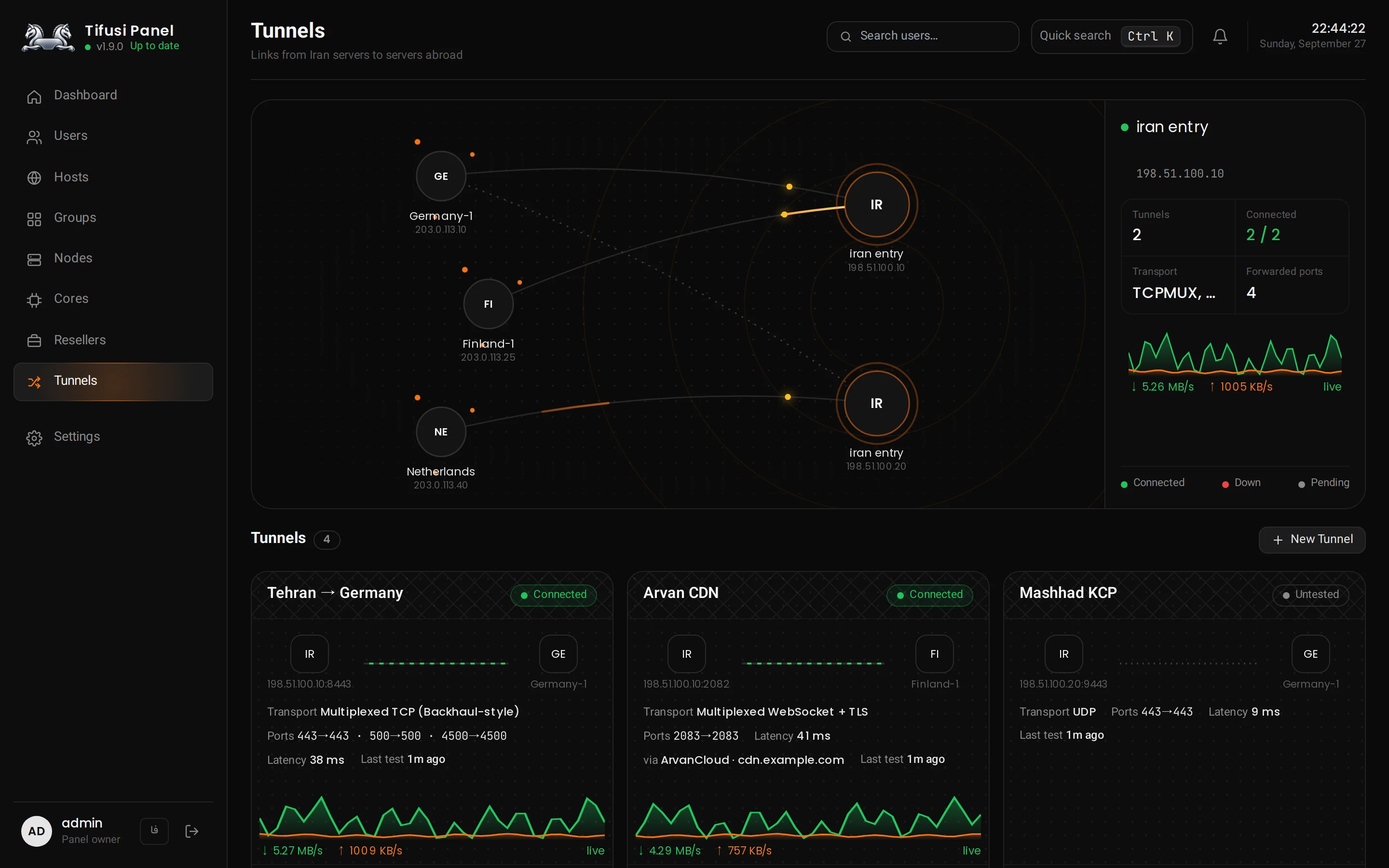
Live map: every tunnel is re-tested every 15 seconds and its traffic graph updates each second.
flowchart LR
    Client(["Client"]) -->|"public port"| Relay["Relay server<br/>inside the restricted network"]
    Foreign["Foreign server<br/>node or any server"] -->|"outbound connection<br/>chosen transport"| Relay
    Relay -.->|"forwarded ports"| Foreign
The relay runs as its own agent on both servers. The panel stores the tunnel’s configuration and generates the install command for each side, so the token and port map are never typed twice; it does not manage the agent after installation.
Creating a tunnel
Section titled “Creating a tunnel”| Setting | Purpose |
|---|---|
| Relay address and port | The public listener clients connect to. The port defaults to 8443. |
| Foreign side | A node already registered in the panel, whose address is reused, or any other server by address. |
| Transport | How the foreign side connects to the relay (see below). |
| SNI and domain | For tls, wss and wssmux. A domain can be issued a Let’s Encrypt certificate during installation. |
| Path | For ws, wss, wsmux and wssmux. |
| Connection count | How many physical connections the foreign side keeps open. Defaults to 8. |
| Forwarded ports | Named port mappings, each TCP or UDP, from a relay port to a port on the foreign server. |
A token is generated automatically for each tunnel.
Transports
Section titled “Transports”The form offers four:
| Transport | Use |
|---|---|
TCP Mux (tcpmux) |
Fastest; the foreign server connects straight to the relay. |
TCP + Stealth (tcpstealth) |
TCP Mux with every byte encrypted and randomly padded, so the link has no clear-text handshake or fixed packet sizes for DPI to match. The relay stays silent to anything that isn’t the tunnel, so a probe learns nothing. |
WSS Mux (wssmux) |
WebSocket over TLS. The most filter-resistant, and the only one a CDN carries. |
UDP (KCP) (udp) |
For links where TCP is disrupted. |
Tunnels created earlier with tcp, tls, ws, wss or wsmux keep working; editing one shows its transport as a legacy card.
Through a CDN
Section titled “Through a CDN”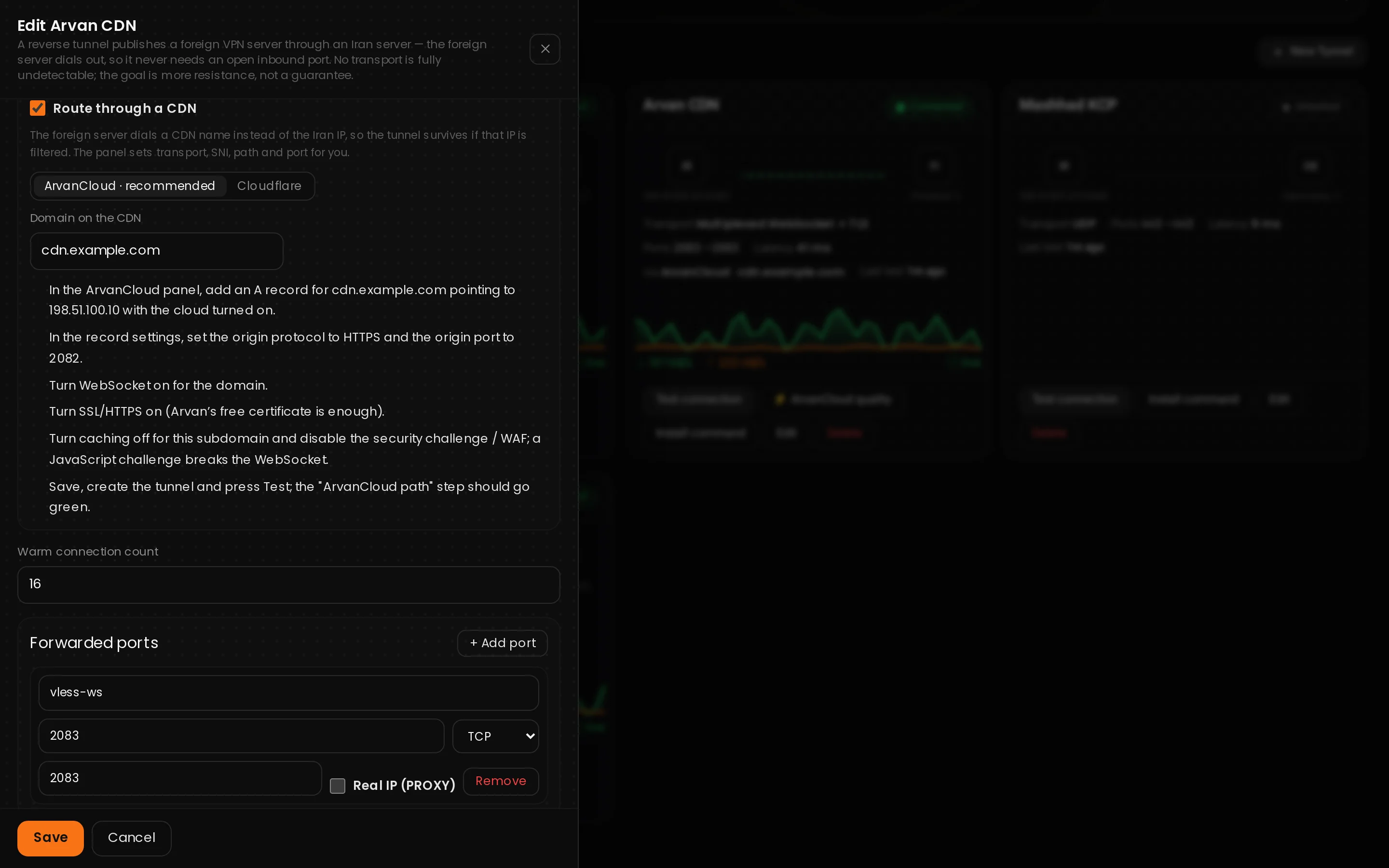
With WSS Mux selected, Route through a CDN makes the foreign server dial a CDN name instead of the relay’s IP, so the tunnel survives if that IP is filtered. ArvanCloud is the recommended provider inside Iran; Cloudflare also works.
- Tick Route through a CDN, choose ArvanCloud or Cloudflare and enter the domain you will point at the relay.
- The panel sets the SNI to that domain, picks a random WebSocket path and fixes the port: ArvanCloud keeps the relay’s port as the origin port; Cloudflare only proxies 443, 2053, 2083, 2087, 2096 and 8443, and reaches the relay on the same port, so the relay port follows your choice.
- Follow the checklist under the form: an A record to the relay with the CDN proxy on, HTTPS to the origin on the tunnel port (Full SSL on Cloudflare), and WebSocket on.
- Test connection adds a CDN path step: the panel opens a real WebSocket upgrade through the CDN to the relay and turns green only on a
101answer.
ArvanCloud bills traffic that passes through it, so everything the tunnel carries counts.
CDN quality
Section titled “CDN quality”⚡ ArvanCloud quality on a CDN tunnel’s card opens three real checks. They run on the foreign server when it is a panel node (the machine that actually dials the CDN), otherwise on the panel server, and the sheet says which.
- Clean IPs. About 128 edge addresses spread across the provider’s published ranges are each tried with a real WebSocket upgrade through to your relay; the ten fastest are re-tried three times and listed with their median time, spread and how many of the three succeeded. The best three are ticked. Saved edges go into the foreign config as
servers: the tunnel spreads its connections across them and skips one that stops answering. - Front SNI (domain fronting). Well-known Iranian sites are resolved to see which really sit on the same CDN, then each is tried as the TLS name while the WebSocket
Hoststays your domain. Only the ones that actually carried the connection to your relay are offered. With one chosen, the foreign side’s TLS names that site and the CDN routes onHost. - Real speed test. Downloads 8 MB from the relay through the CDN over the tunnel’s own protocol, using the saved edge and SNI, and reports Mbps and ping. Run it before and after a change.
After Save, the sheet shows the foreign install command; run it once on the foreign server to apply the new edges and SNI. The speed test needs the updated tunnel program on the Iran server too, so re-run the relay’s install command once as well.
With the CDN option ticked the form also raises the connection count from 8 to 16, since a CDN limits each connection’s speed.
Stealth relay (decoy for active probing)
Section titled “Stealth relay (decoy for active probing)”A WebSocket relay used to answer any request that wasn’t the tunnel’s with a bare 404. A server on 443 that holds a real certificate and then only ever 404s is itself a tell: an active probe — a monitoring system that connects and looks at what comes back — marks the address as “not a real website” and it gets burned.
With Stealth relay on (the default for new ws/wss/wsmux/wssmux tunnels), any request that isn’t a genuine tunnel WebSocket upgrade — a browser, a scanner, a wrong path — gets an ordinary static web page with a 200, served over the relay’s real certificate. The probe sees an unremarkable website instead of a silent relay. A real tunnel client (the exact path with the WebSocket upgrade) is unaffected and connects as before.
- It applies only to the WebSocket-handshake transports, the ones that terminate a real HTTP request a probe can send.
TCP + Stealthalready answers a probe with silence by design and is left as it is. - It is a per-tunnel toggle and is set on the server (Iran) side only.
- Existing tunnels are never changed: the toggle defaults off for tunnels created before this, and takes effect only when a tunnel is created with it on or re-installed (run the Iran side’s install command again, or 🔄 Update tunnel).
Choosing a transport
Section titled “Choosing a transport”Before the tunnel exists, Recommend best transport probes both servers and reports reachability and latency to each, then ranks the transports. The ranking reflects what can honestly be measured from outside the restricted network; it cannot predict how a particular filter will treat each transport, so test the chosen one after installation.
Link test
Section titled “Link test”Recommend best transport probes each server from outside. To measure the path the tunnel itself will use, run the link test between the two servers: tifusi-tunnel linktest serve --port 8443 on the Iran server, then tifusi-tunnel linktest run --to <iran-ip> --port 8443 on the foreign one. It sends timestamped UDP probes and times TCP handshakes, then prints UDP loss, round-trip time (min/avg/p95/max) and jitter, how many TCP handshakes succeeded, and a suggested transport: tcpmux on a clean path, udp (KCP with FEC) when UDP loss or jitter is high or TCP handshakes fail. Use a port that is open on the Iran server and not already in use.
Installing and testing
Section titled “Installing and testing”- Open the tunnel and copy the install command for each side. Like the node command, it fetches
backend/tunnel_agent/install.shfrom the panel’s own release tag and runs it only after its SHA-256 matches the checksum built into the panel. - Run the relay command on the relay server and the foreign command on the foreign server.
- Select Test connection. The panel checks that it can reach the relay server, the foreign server and the tunnel’s public port, and records the tunnel as
connectedorerrorwith the latency and time of the check. Audptunnel cannot be checked from outside; its service log is read on the relay server withjournalctl -u tifusi.
Install and update over SSH
Section titled “Install and update over SSH”The tunnel’s 🔑 Install over SSH button does the install for you, one side at a time. It is an extra option; the one-line commands and the offline bundle download keep working as before.
- The SSH address defaults to the tunnel’s own address for that side (the Iran address, or the foreign node or address); change it only if SSH lives elsewhere. Enter the password or a private key for the first connection only — the panel installs its own key (the same one used for nodes) and later connections need nothing typed. Credentials are never stored; the host key is pinned on first contact.
- Automatic runs the usual online installer when the server can reach GitHub, and otherwise sends that side’s offline bundle over SFTP and installs it (also the fallback when the online install fails midway). Online and offline can be forced.
- The installer’s output streams into the sheet; if it fails, the last lines of the tunnel’s service log are shown. Every install ends with the tunnel’s health test. The offline bundle stays on the server (0600) for a reinstall during a shutdown.
🔄 Update tunnel in the same sheet moves an installed side to the newest tunnel binary with automatic rollback: the new binary is checked on the server against the current config before anything changes, the old one is kept as tifusi-tunnel.prev, and it comes back by itself if the service doesn’t stay up or the tunnel’s live links don’t return within 45 seconds. The config is never changed. See Safe updates.
SSH install and update are open to the panel owner only.
Chains (multi-hop routes)
Section titled “Chains (multi-hop routes)”A chain carries traffic through an ordered list of hops instead of one relay: user → entry (Iran, public) → middle → … → exit (the real server). It is built entirely from the ordinary reverse tunnel, so nothing about the tunnel program changes: N hops make N−1 segments, each one a normal tunnel with its own transport — for example TCP + Stealth inside Iran and WSS Mux behind a CDN abroad.
Open Tunnels → 🔗 Chains.
- Hops. The first is the entry (the public address users connect to), the last the exit, anything between is a middle. Each hop but the exit owns the segment down to the next hop: its transport, tunnel port, SNI/path and connection count. The next hop dials that port, so only the entry and the middles need an inbound tunnel port, each on its own port.
- Forwarded ports. Users connect to a public port on the entry; the exit delivers to the target (default
127.0.0.1). The service port is the internal port carried from hop to hop. - A middle runs two services on its server — the client of the segment above and the server of the segment below — and hands traffic from one to the other over
127.0.0.1, never over the network. So a middle’s forward ports open no firewall hole; only each segment’s tunnel port and the entry’s public ports do. - Subscription protocols only. A chain carries what a subscription delivers (VLESS, VMess, Trojan, Shadowsocks, Hysteria2 over TCP). IKEv2 and L2TP are set up by hand on the phone and are not routed this way.
Install and test
Section titled “Install and test”Each hop is installed on its own with its own SSH credentials, the same way each tunnel side is (Install and update over SSH): Install this hop asks for that server’s password once, adds the panel’s key, sends the tunnel binary over SFTP, and writes each service’s own config (0600) and tifusi-<name>.service. A live log follows. Test chain then opens the entry’s public ports from the panel — which only answers if every hop relayed the connection through to the exit.
Every 5 minutes the panel also probes each segment’s tunnel port and the entry’s public TCP ports and shows the result on the chain, naming what isn’t reachable. UDP segments and forwards can’t be checked with a TCP connection and are left out, so a UDP-only chain stays “ready to install” rather than being marked broken.
Chains are owner-only, and a chain never changes an existing tunnel.
Real client IP (PROXY protocol)
Section titled “Real client IP (PROXY protocol)”Behind a tunnel every connection reaches the foreign service from the tunnel itself, so a device limit that tells devices apart by address sees one device for all of a user’s phones. Tick Real IP (PROXY) on a TCP forward and the foreign side opens each connection to the target with a PROXY protocol v2 header carrying the user’s real address and port.
The target must expect the header: in Xray, set "acceptProxyProtocol": true in the inbound’s streamSettings.sockopt (or tcpSettings/wsSettings). A service that isn’t expecting it reads the header as garbage and the connection fails, so give the tunnel its own inbound on a separate port rather than turning it on for an inbound direct users also reach. UDP forwards can’t carry it; IKEv2 and L2TP limits count sessions per user and don’t need it.
Spoof test
Section titled “Spoof test”Some tunnel types depend on the relay’s datacenter allowing packets with a forged source address to leave its network. The IP Spoofing card in the transport picker generates two commands, one for each server, that check this before any such tunnel is built. Nothing runs on the servers until the commands are executed there.
- Protocol. The probes can ride UDP, ICMP, ICMPv6 or TCP. A datacenter or filter can drop forged UDP yet pass another protocol, so test each one you might use. All but UDP need root on the receiving server too.
- Direction. The tunnel forges a source both ways, so run the test in both directions: Iran → foreign and foreign → Iran.
- Loss per source. The receiver lists every forged source that arrived with how many of its probes got through, for example
5/5 packets loss 0%. With Max acceptable packet loss set, a source over it is markedxand not counted as usable.
On the command line the same test is tifusi-tunnel spooftest recv|send --proto udp|icmp|icmpv6|tcp; recv --max-loss N --out file writes the usable sources to a file, one per line, ready to use as the spoof source list on the other side.
Spoof tunnels
Section titled “Spoof tunnels”A spoof tunnel stamps a forged source address on every packet, so it passes a filter that allow-lists source and destination addresses. Both datacenters must let forged packets out — check with the spoof test first.
| Setting | Purpose |
|---|---|
| Spoof source | The forged address, or a list, range (a-b) or CIDR to rotate across per packet. |
| Carrier | What the forged packets look like on the wire: UDP, ICMP (Echo Reply), ICMPv6 (Echo Reply inside IPv4, protocol 58) or TCP (PSH|ACK segments). Auto tries each and settles on one that works. |
| Return carrier | Optional. The carrier for foreign → Iran when it should differ from the one above, which then covers Iran → foreign only — for example TCP out and ICMPv6 back, since a filter often treats the two directions differently. The panel sets each side as the mirror of the other. Not available with Auto. |
| Advanced stealth | Randomises TTL, DSCP and source port and accepts only the configured forged source. |
ICMPv6 is worth trying when ICMP is blocked: a firewall that shuts IPv6 down often leaves ICMPv6 alone, and a rule written for ICMP doesn’t match it.
The TCP, ICMP and ICMPv6 carriers add their own iptables rules while the tunnel is up and remove them when it stops. The server’s firewall would otherwise call an Echo Reply that answers no request, or a TCP segment with no handshake, INVALID and drop it (ufw does by default), so these packets skip connection tracking and are accepted. The TCP carrier also drops the kernel’s reset replies to the forged sources, only bare resets, so a real TCP service on the same port keeps its own.
Tunnels and IKEv2 or L2TP
Section titled “Tunnels and IKEv2 or L2TP”For native IKEv2 or L2TP through a tunnel, forward UDP 500 and 4500 from the relay to the foreign server, and UDP 1701 as well for L2TP clients without IPsec. The host published to users then points at the relay’s address.
The relay delivers IKEv2 (UDP 500 and 4500) to the foreign server’s own address rather than 127.0.0.1, so the tunnel needs its foreign side set (a node or an address). Delivered to loopback, the server would see every phone as 127.0.0.2 and could never send it the encrypted replies: the phone connects but gets no traffic. A tunnel installed before this change keeps the old target until its relay install command is run again.